

Published 6 October 2026 · By JonsTech
Prepare One Video for TikTok, Reels, YouTube Shorts and X
A practical pre-flight guide to cross-posting one video to TikTok, Instagram Reels, YouTube Shorts and X, with the format checks, account requirements and caption changes to make before scheduling.
Yes, you can publish the same core video to TikTok, Instagram Reels, YouTube and X, provided the file and connected accounts are suitable for each destination. Before scheduling, start with a clean source video, check the format and account requirements, tailor each platform’s copy and settings, then review WooshOut’s compatibility indicators. A single upload can be the starting point, not a reason to send four identical posts.
WooshOut’s composer lets you select compatible accounts, adjust supported settings and captions per network, and check each destination before publishing. Results are tracked separately, so you can see which destinations published and which need attention. Here’s the practical pre-flight. See the full publishing workflow.
1. Start with a clean source video
For a cross-platform short-form post, a vertical MP4 is a sensible starting point. Avoid baking platform-specific buttons, captions or watermarks into the picture if you can; keep important text and faces clear of the screen edges, too. That gives you a cleaner base to preview in each destination. WooshOut’s common upload flow accepts one video per post, up to five minutes and 500 MiB. MP4 or MOV is a practical choice across the networks; the file still has to fit the selected destinations.
For this four-network set, check the video length against X before you upload. In WooshOut’s common flow, standard X accounts have a 2-minute-20-second limit. X’s own current help page gives the same 140-second limit for accounts that are not Premium subscribers, while longer uploads depend on subscription and platform conditions. A video within 140 seconds avoids that particular mismatch, but other checks still apply. X’s video guidance explains its current account limits.
A suitable vertical video of 90 seconds or less is a straightforward example to check across all four. That is not a guarantee of publication: account authorisation, media processing and provider rules can still affect the outcome.
2. Check what each destination will do with it
The same file can be accepted in different ways, and the platform may decide how it appears. Check these points before you select a time:
TikTok: Choose direct posting or a TikTok draft where available. If you choose a draft, you’ll need to finish and publish it in TikTok. Privacy and interaction options depend on the connected account and provider support. TikTok lists MP4, MOV and WebM among supported video formats in its posting API guidance. TikTok’s media guide has the current technical details.
Instagram Reels: WooshOut publishing requires a compatible professional Instagram account and valid permissions. Check that the right account is connected before preparing the post. Meta’s publishing documentation describes content publishing for Instagram professional accounts. Read Meta’s Instagram publishing requirements.
YouTube Shorts: WooshOut uploads the video; YouTube determines whether it is classified as a Short. YouTube says square or vertical videos up to three minutes can be uploaded as Shorts. There is no manual Shorts switch in WooshOut, so check the video’s shape and length rather than relying on a label alone. YouTube’s Shorts upload guidance explains the current classification criteria.
X: The common WooshOut flow uses the standard account limit of 140 seconds. If the connected account has different native allowances, don’t assume they also apply through this publishing workflow. Keep the video within the limit shown for your post.
Platform-specific limits and available controls can change. The platform documentation is useful for checking provider rules, but WooshOut’s upload flow and compatibility review determine whether your selected combination is ready to schedule.
3. Select destinations, then review the composer
In Create post, add the video, choose the connected TikTok, Instagram, YouTube and X accounts, and review the platform settings tabs. WooshOut checks the selected media, post type, content and settings, marking destinations ready, warning or blocked. A warning is a prompt to inspect the details, not something to wave through automatically. Check connection health as well: a destination that needs reconnecting may block new publishing work.
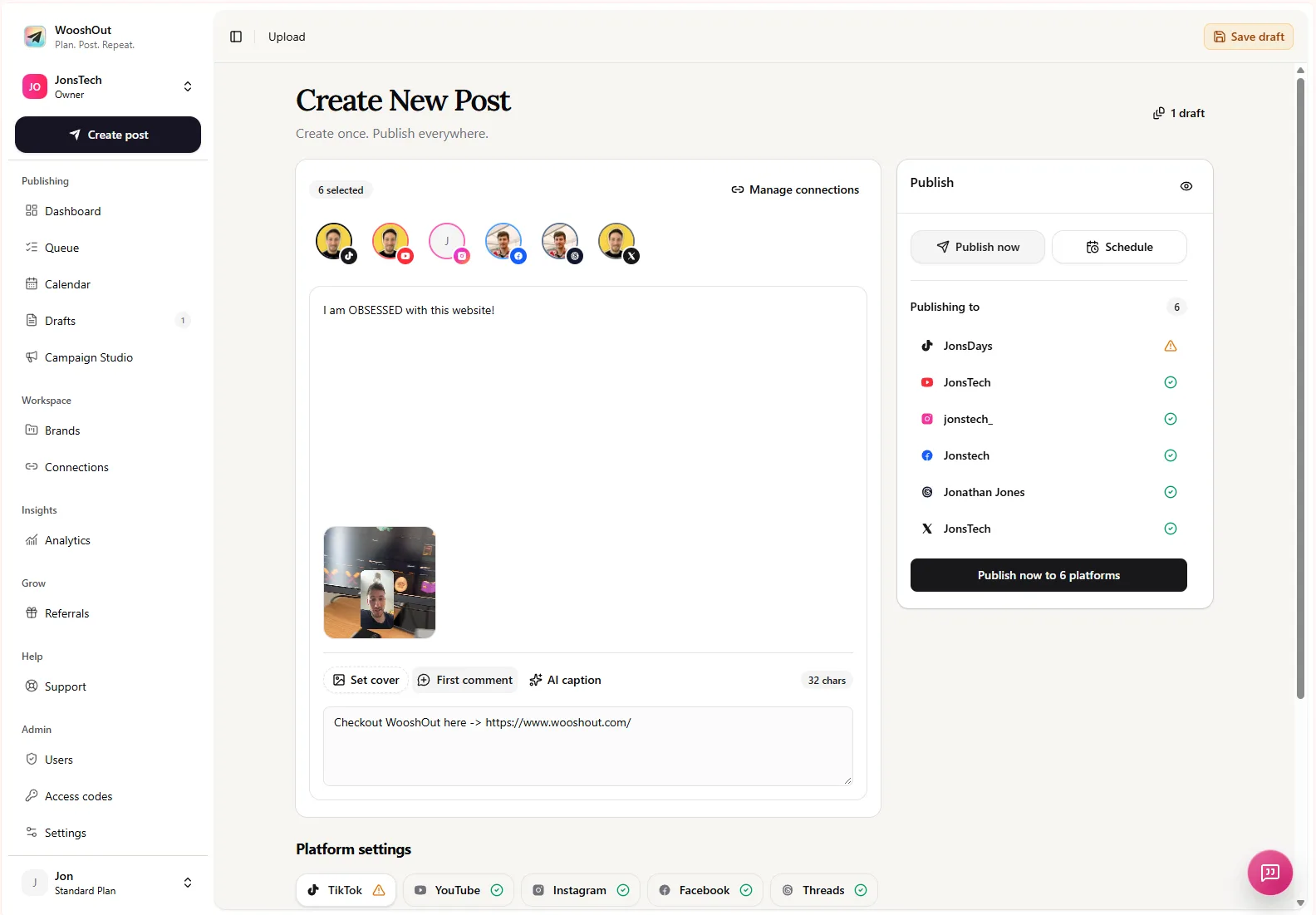
In the composer view above, the selected accounts appear alongside the video preview and separate platform settings. Before scheduling, inspect each selected account’s status and open the tabs for the destinations you intend to use. Don’t assume that selecting four accounts means all four are ready.
4. Adapt the copy instead of duplicating it blindly
Keep the video’s central idea consistent, but give each platform’s caption a clear job. For example, imagine a SaaS founder sharing a 90-second screen recording that shows how their app turns a messy task into a simple workflow. The shared starting caption could be: “Here’s a quicker way to organise your weekly launch tasks.” Then tailor the emphasis:
TikTok: Lead with the visible problem or result, and use relevant hashtags if they add context.
Instagram Reels: Make the opening line clear on its own, and decide whether the Reel should also be shared to the feed where that setting is available.
YouTube: Add a distinct title, plus an optional description and search tags. Check visibility and other available video settings.
X: Give the clip enough context in the post text for someone encountering it in a feed, and keep within any account-specific text or media constraints shown.
WooshOut supports shared copy with per-platform caption overrides and destination-specific settings where available. Its AI can suggest social copy, including a YouTube description and tags or relevant hashtags for TikTok and Instagram, but treat suggestions as editable drafts. Check the product name, claims and call to action yourself before posting.
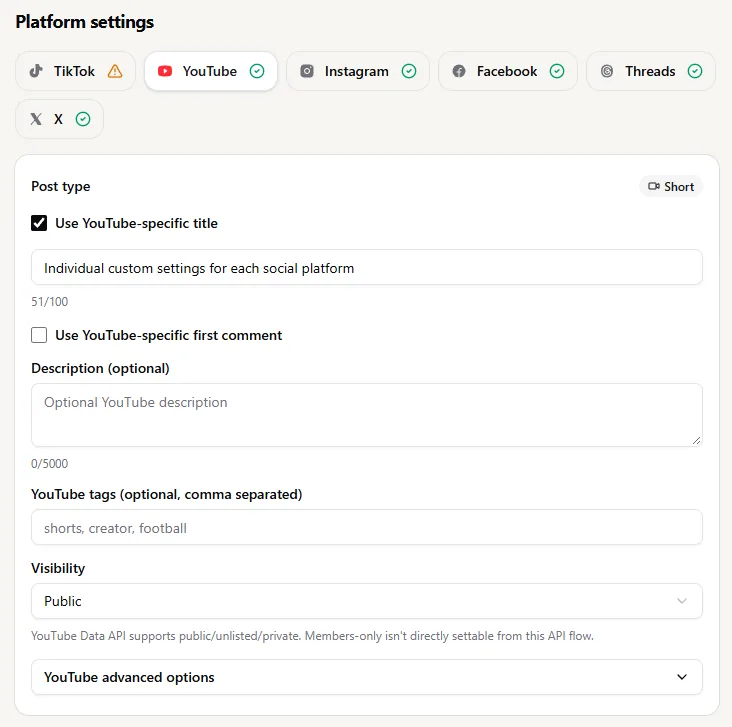
The YouTube settings shown here include a Short label, a separate-title option, description and tags fields, and visibility controls. Use the destination’s settings to make the video fit its context, then preview the effective post before you commit.
5. Schedule only after the pre-flight
Confirm the source file is within WooshOut’s common upload limits and the X video length fits the standard-account limit in this flow.
Check that Instagram is connected through a compatible professional account and that each selected destination is healthy.
Review the platform-specific caption, title, description, privacy or visibility choices offered for each network.
Inspect compatibility statuses and previews. Fix anything marked blocked and consider warnings before proceeding.
Choose publish now or set the schedule, date, time and timezone. Once queued, publishing continues in the background.
Each destination is handled as a separate publishing operation. If TikTok succeeds but another network fails, WooshOut keeps those outcomes separate so you can see what happened and review a retry option when one is available. It cannot guarantee every provider will accept every post, so check the Queue after publishing rather than treating the scheduled status as a final result.
The practical answer
One video can be the source for TikTok, Instagram Reels, YouTube Shorts and X. The safer workflow is one upload, four reviewed destinations: check the file and account fit, adapt the copy and settings, then let compatibility review surface anything that needs a change. For a reusable checklist before your next cross-post, see the cross-platform publishing checklist.