Create, cross-post, and track content across six social networks.

Create campaigns, publish across six social channels, schedule content, and see what performs from one workspace.

  • 6 social platforms
  • Campaign generation
  • Cross-network analytics
Publish to six social networks
Upload once, choose your accounts, and publish to TikTok, YouTube, Instagram, Facebook, Threads, and X from the same composer.
  • Video, image, and text posts
  • Publish now or schedule
  • Separate result for each account
Social media calendar
Choose a date and timezone, see every scheduled post on the calendar, and follow upcoming work through the publishing queue.
  • Timezone-aware scheduling
  • Calendar and queue views
  • Cancel or publish queued posts
Controls for each platform
Write one shared post, then change the caption, first comment, privacy, reply controls, tags, covers, and other settings where supported.
  • Shared or custom captions
  • Post-type and privacy settings
  • Platform compatibility review
Cross-network analytics
Review the audience, performance metrics, and top content reported by your connected social accounts from one workspace.
  • Provider-reported metrics
  • Top content by time range
  • Cached analytics refreshes
AI Campaign Studio
Turn a product brief into a batch of text posts or branded image carousels, review every draft, and schedule the approved campaign.
  • Generate up to 30 text posts
  • Create 3–6-slide carousels
  • Schedule the campaign in one launch
Drafts, status, and retries
Save unfinished posts, keep media and settings together, and see which destination succeeded, failed, or needs a safe retry.
  • Reusable post drafts
  • Per-platform timeline
  • Targeted retry paths
Composer

Write once, then make each social post fit.

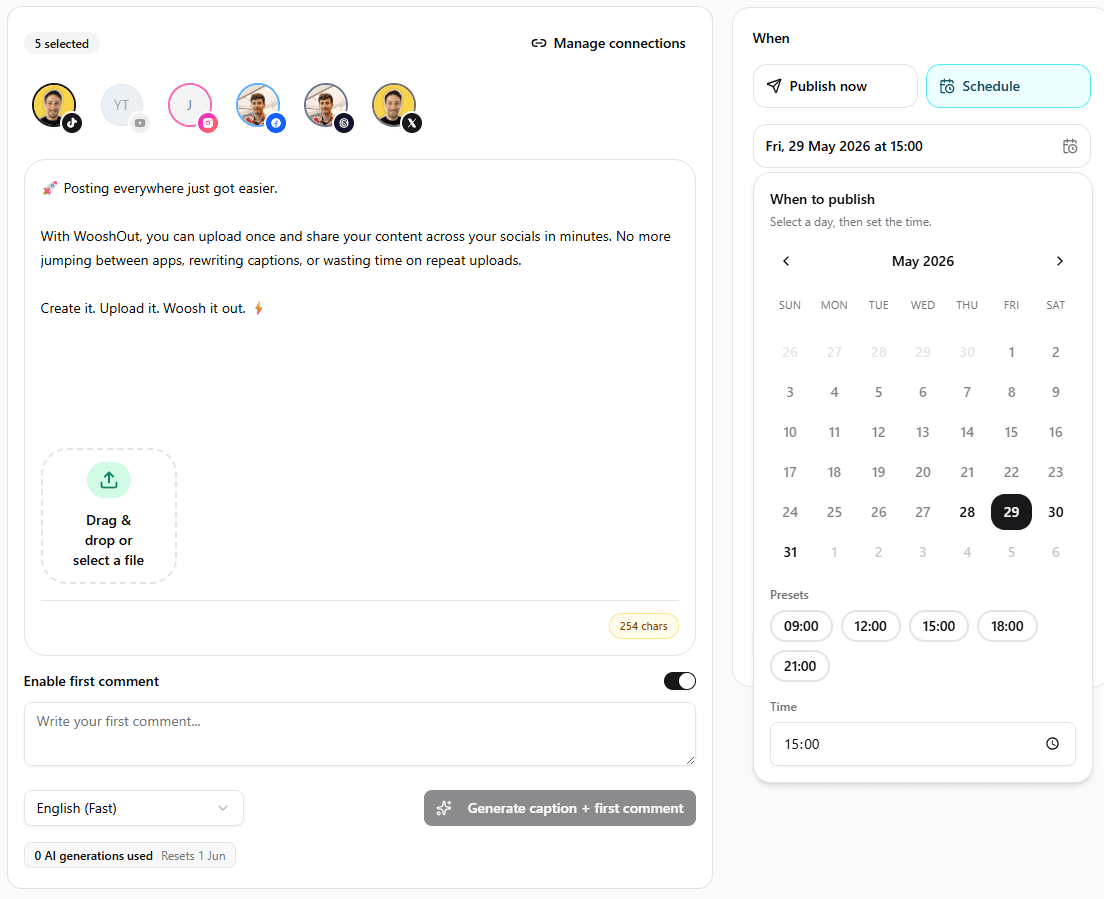
Add your video, images, or text in one composer. You can keep the shared caption or customise the copy and publishing options for individual networks before anything goes live.

Read the publishing guide
WooshOut composer with shared content and platform-specific settings.
Campaign Studio

Generate weeks of posts from one campaign brief.

Give WooshOut your product details, audience, and campaign brief. Generate up to 30 text posts or a set of image carousels, edit every draft, choose the accounts and times, then schedule the approved campaign.

Text campaigns
Create editable posts for Facebook, Threads, and X, with copy kept within X's character limit.
Image carousels
Turn reusable product screenshots into editable 3–6-slide posts with your chosen template settings.
AI and safeguards

Use AI for the first draft, not the final say.

WooshOut can prepare copy and campaign ideas, but you still review the content, accounts, timing, and platform settings before launch.

AI captions and comments

Generate a caption, hashtags, and a first comment, then edit the result before publishing. Comments are sent only where the platform supports them.

Media transcription

Turn stored video audio into useful context for caption creation and content review.

Reusable image templates

Save product screenshots, tune the phone-frame template, and reuse those assets across AI-generated carousel campaigns.

Checks before publishing

Catch incompatible media and accounts that need reconnecting before they create failed publishing work.

Supported platforms

Publish the formats each network accepts.

The composer checks the selected media against each destination and shows a warning or block when the combination does not fit.

TikTok
Video and photo drafts or direct posts
YouTube
Shorts and standard video uploads
Instagram
Reels and image feed posts
Facebook
Reels, image posts, and text posts
Threads
Video, image, and text posts
X
Video, image, and text posts
Questions

What you can do with WooshOut.

Straight answers about multi-platform scheduling, AI content creation, and analytics.

Can I schedule one post on several social platforms at once?
Yes. Choose any connected TikTok, YouTube, Instagram, Facebook, Threads, and X accounts that fit the media, then publish immediately or schedule one shared time.
Can I change the post for each social network?
Yes. Start with shared content and add platform-specific captions, comments, publishing modes, privacy options, reply controls, tags, or covers where those settings are supported.
How does WooshOut's AI social media post generator work?
The composer can draft captions, hashtags, and supported first comments from your post or video transcript. Campaign Studio can also create a batch of text posts or image carousel drafts from your brief and reusable screenshots.
Does WooshOut include social media analytics?
Yes. The Analytics page shows provider-reported audience and performance metrics, recent sync health, and top content for connected accounts when the network makes that data available.

Choose your destinations and set a publish time.

Start with your own media or an AI-assisted campaign, review the platform settings, and send approved work to the queue.

  • TikTok, YouTube, Instagram, Facebook, Threads, and X
  • AI captions, text campaigns, and image carousels
  • Scheduling, analytics, and per-platform status