

Published 3 October 2026 · By JonsTech
How to Create a SaaS Educational Content Series from a Product Brief
A practical way for SaaS founders to turn product knowledge into reviewed, editable social posts using WooshOut Campaign Studio.
Start with what your product helps someone do, then turn that into several distinct teaching points. WooshOut Campaign Studio’s text campaigns can generate editable post drafts from a product description, audience and brief. You review and revise the drafts, choose connected Facebook, Threads or X accounts, and schedule the posts you approve. The AI gives you a starting point, not a finished campaign.
That distinction matters. A product description is usually written to explain what you built. A useful social series should also answer the questions a potential customer has: What problem does this solve? When would I use it? What should I know before choosing it? A short, thoughtful review helps bridge the gap.
Begin with a brief that gives the AI something to work with
Before opening Campaign Studio, gather the facts you would want a new customer to understand. Include who the product is for, what job it does, how it works, and any important limits. Add the language customers use when they describe the problem, if you have it. Avoid vague claims such as “the easiest tool” unless you can substantiate them.
Then shape those facts into a campaign brief. Instead of asking for “posts about our app”, give the AI a useful editorial direction: explain a recurring problem, show a practical workflow, answer a common objection, or help a particular audience make a decision. You can also specify the tone and what the posts should not claim.
For example, a brief might say: “Create educational posts for independent physiotherapists who are comparing appointment-booking tools. Explain how online booking can fit into a clinic’s routine. Keep the advice practical. Do not promise fewer missed appointments or imply that every clinic needs the same setup.” The details about any real product should come from its approved description, not from an AI guess.
Generate a range of standalone post ideas
In Campaign Studio, provide the product description, audience and brief, then choose how many text posts to generate. The described workflow supports a campaign of 1–30 editable standalone posts, directed at Facebook, Threads and X. Treat that as a set of raw material to review, not a promise that every draft will be distinct, accurate or ready to publish.
A useful series has variety without losing its thread. Look for drafts that explain a concept, walk through a task, clarify a choice or address a genuine concern. If several posts make the same point in slightly different words, keep the clearest one and ask for a different angle rather than padding the schedule.
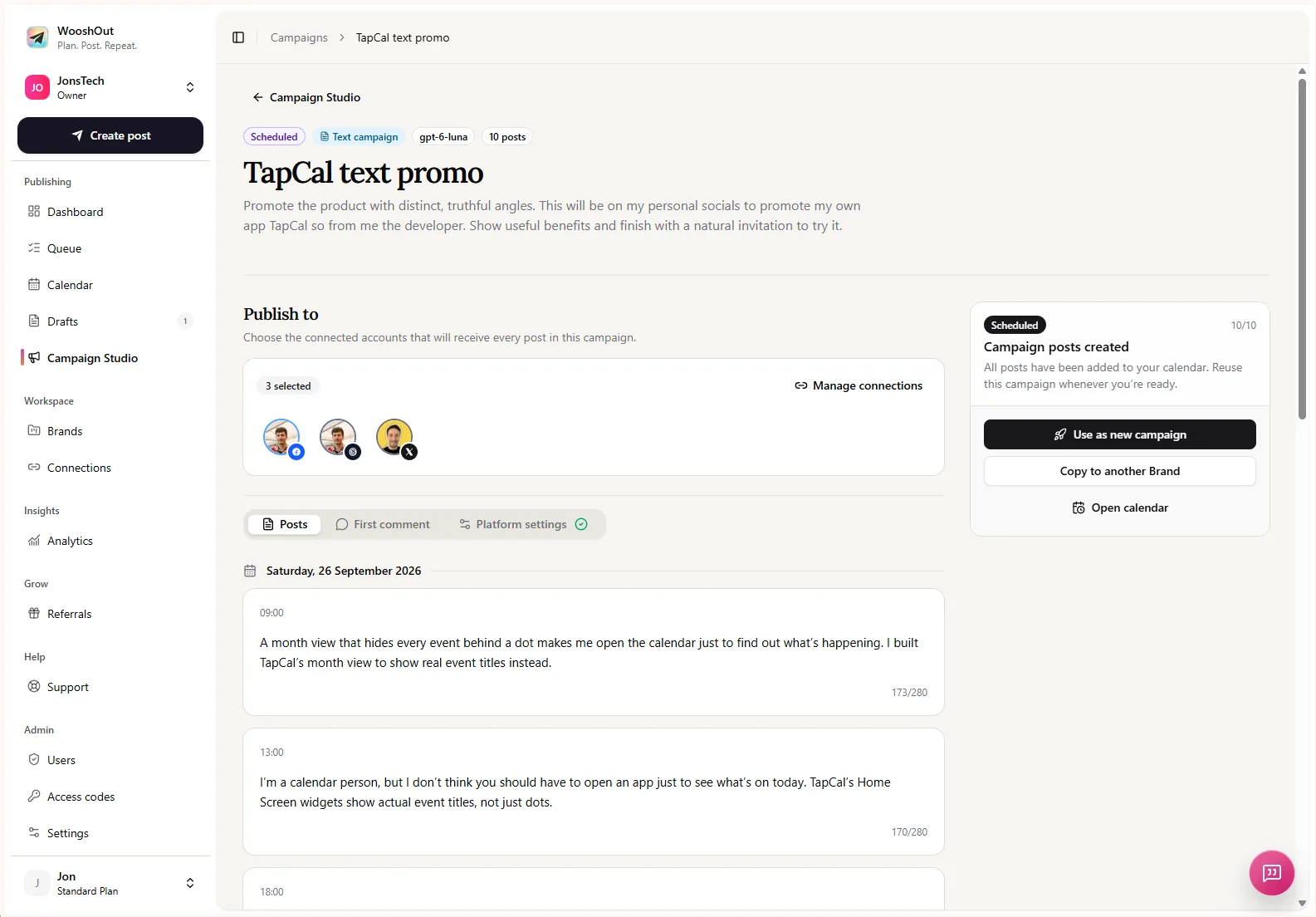
Campaign Studio’s text campaign screen shows a generated campaign with posts, destination accounts and campaign controls. Use that review stage to check the substance of each post before you move on to scheduling.
A worked example, clearly labelled
The following is an illustrative example, not a real customer campaign or a claim about posts generated by WooshOut. Imagine a fictional booking app for independent physiotherapists. Its founder-approved product brief says: “The app gives clinics an online booking page, lets patients choose from available appointment times, and sends booking reminders. It is designed for independent practices. It does not provide clinical records or guarantee that patients will attend.”
A founder could use that source material to develop and edit posts like these:
“What should a patient see before they book? Start with the basics: the appointment options you offer, the times available and a clear next step. An online booking page can bring those details together.”
“Setting up online appointments? First decide which appointment types people can book, how much time each needs and when you want those slots available. A booking tool works best when its options match your clinic’s routine.”
“A booking reminder is a prompt, not a guarantee that someone will attend. If you use reminders, make sure the wording and timing suit the way your clinic communicates with patients.”
These examples turn product details into useful, standalone advice while retaining the boundary in the brief. Before publishing, the founder would still need to confirm that the wording accurately reflects the product and any relevant policies. The exercise also reveals missing information: if you cannot explain what a reminder does, do not let an AI fill in the blanks.
Edit for accuracy, usefulness and voice
Read each post as a reader would, rather than as the person who wrote the product description. Check that the opening makes the subject clear, the advice stands on its own, and the post does not quietly expand a capability. Remove invented outcomes, unsupported superlatives and details you have not confirmed. If a post needs a product-specific fact, verify it against your approved materials.
Then make the copy sound like your company. Replace stock phrasing with words your audience would recognise. Add a concrete example where you have one, but do not disguise a hypothetical as a customer story. A modest post that helps someone make a decision is more credible than a sweeping claim about what your tool will achieve.
Finally, check for repetition across the series. Reorder posts so each adds a new idea, and remove drafts that do not earn their place. If a reader can understand each post without seeing the one before it, the series is easier to share and schedule in pieces.
Choose destinations, then schedule the approved posts
Once the content is reviewed, choose the connected Facebook, Threads or X accounts that fit the campaign. Those are the destinations for text campaigns in the described Campaign Studio workflow. Select accounts deliberately: a post can be relevant to one audience and out of place on another. Where the composer offers platform-specific settings or copy, check those before scheduling too.
Set a start date, posting times and timezone that suit your publishing plan. Campaign posts scheduled through WooshOut appear in the normal Calendar and Queue, where you can follow scheduled work and see publishing outcomes. Each destination has its own result, so a problem on one network does not conceal what happened on another. Check the live product interface before relying on particular controls or provider behaviour, which can change.
Keep the source brief as your reference point
A repeatable process is simple: prepare an accurate product description, brief the campaign around a reader’s real questions, generate a manageable set of drafts, edit them against the source facts, then schedule only the posts you approve. Keep the brief handy when reviewing later edits or reusing a campaign. It helps the series stay useful without letting the product story drift.
For another practical way to turn product news into planned content, see how to turn product updates into a week of social media posts. To see how WooshOut’s wider publishing process works, visit the workflow guide.