

Published 31 October 2026 · By JonsTech
How to Promote a SaaS Without Testimonials
A practical way to build trust in your SaaS launch with product demonstrations, useful lessons, honest answers and claims you can substantiate.
You can promote a SaaS before you have testimonials by showing the product doing a real job, sharing what you know about the problem, answering buyer questions and making only claims you can prove. A clear screen recording of one task can be more useful than a row of unsupported promises. Treat the first campaign as a way to help people understand the product, not as a substitute for customer evidence.
Build trust with evidence you already have
A new product may not have reviews, case studies or a long list of customers. That does not mean every post has to say, “We’re new.” It means your content should lean on things you can show and explain: the interface, the steps in a workflow, the problem you designed for, and the limits of what the software does.
Show a task from start to finish. Record a short demo that makes the starting point, action and result visible. Use the current product, not a mock-up that could be mistaken for a live feature.
Teach one useful thing. Explain a common setup decision, workflow or mistake in your product’s area. The lesson should still help someone who is not ready to buy.
Answer a real buyer question. Cover what the product does, who it suits, what it does not do, or how a typical task works. Use questions you have actually heard or reasonably expect, and label assumptions as such.
Make a claim only when you can substantiate it. Be precise about what the product does, what is included, and what someone can verify for themselves.
Before publishing, choose one current product screen or demo and get approval from the founder or product owner. Then agree on one example of a claim the product can support, with evidence behind it. That might be a visible workflow or a documented feature, rather than a promise about time saved, revenue, or customer results. Do not fill the gap with invented feedback or implied success stories.
A sample week of posts before you have reviews
Here is an illustrative week for a hypothetical project-management SaaS. Adapt the subjects to your own product and audience. The example does not assume any customers, results or product features beyond what you can verify.
Monday: Show one real task. Use a short screen recording or a sequence of screenshots to demonstrate a single workflow. Caption it with the problem the task addresses, then describe what is happening on screen. Avoid claiming that the product solves every version of that problem.
Tuesday: Share a practical lesson. Explain one decision a team might face when organising a project, such as what to include in a handover. Keep the advice useful on its own, then briefly show where your product fits, if relevant.
Wednesday: Answer a buyer question. For example: “Can I invite someone who only needs to review the plan?” Answer from the current product, and say plainly if the answer depends on a plan, setting or workflow.
Thursday: Explain one design choice. Describe why a particular step, view or setting exists. Tie the explanation to a user need you can substantiate, rather than presenting your preference as proven market demand.
Friday: Give a short product tour. Walk through the same task from another angle, or show the next step after Monday’s demo. Use current screens and avoid implying that the tour represents an independent customer’s experience.
Weekend, or your next publishing day: Invite a specific response. Ask what part of the workflow people find unclear, or which question they would want answered before trying a tool. Make the invitation genuine, and do not imply that responses will be testimonials.
You do not have to publish every day. A smaller sequence you can keep accurate and useful is better than a packed calendar of repeated launch announcements. Choose a pace that leaves time to check screenshots, confirm details and respond to questions.
Turn product material into a campaign, not a pile of posts
A useful campaign starts with approved raw material: a brief, a few clear product screenshots, and a list of points you are allowed to claim. Organise screenshots by the task or feature they show. Remove old screens, private information and anything that could mislead someone about the current product. For more on preparing those assets, see how to organise SaaS screenshots for social media campaigns.
WooshOut’s Campaign Studio is presented as a way to turn a product brief into editable text posts or image carousels built from screenshots you supply. You can review and edit the drafts before choosing accounts and scheduling an approved campaign. The image posts use your existing screenshots rather than generating new product artwork from a text prompt. Check the current controls and compatibility for your chosen destinations before planning around a format. See the Campaign Studio overview.
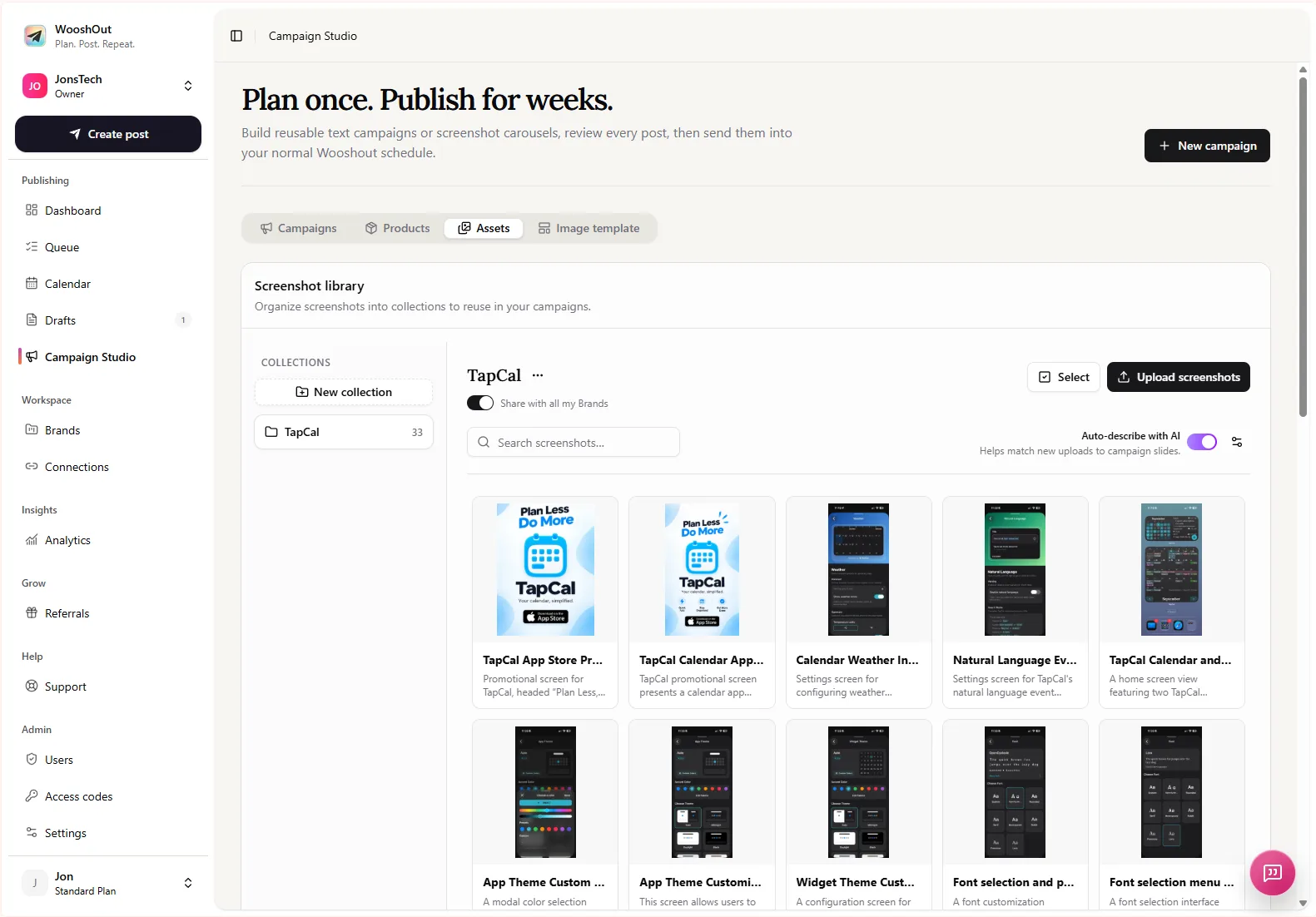
For example, a founder could brief a text campaign around a product’s main workflow, then review each post for accuracy, tone and repetition. For a visual campaign, they could select screenshots that show distinct steps and check that the headline matches what each screen actually demonstrates. These are possible workflows, not a guarantee that every generated draft will be ready to publish.
Review every draft as if a buyer will check it
AI can give you a starting point, but it cannot approve a claim on your behalf. Before scheduling, check each post against the product and the evidence you have. Remove invented customer reactions, unsupported comparisons, unverified numbers and language that makes a planned feature sound available today.
Does the screenshot show the current interface, and is it safe to publish?
Can you demonstrate the action described in the caption?
Is the post clear about what the product does and what remains outside its scope?
Does each destination suit the post’s format and wording, or does it need an edit?
A sensible first campaign does not need to prove that your SaaS has already transformed anyone’s business. It needs to show what the product is, help a potential buyer understand a real use, and leave them with a credible next step. Start with one verified demo and one founder-approved claim, then build the rest of the week around what you can genuinely show.