

Published 26 October 2026 · By JonsTech
How to Plan Social Media Content Around a SaaS Product Demo
Turn a SaaS product demo into a week of distinct social posts by finding separate user problems, shaping a fresh angle for each, adapting the copy and format, then reviewing and scheduling the finished work.
To turn one SaaS product demo into a week of social content, don’t publish the same walkthrough seven times. Find several useful moments in the demo, connect each to a different user problem or question, then make each a separate post with its own purpose. You might have a short clip, a text explanation, a screenshot-led post and a practical tip, all drawn from the same product feature. WooshOut can help you prepare destination-specific versions, save drafts and schedule the posts, but it won’t automatically extract clips from your video or decide which moments are worth sharing.
Start with moments, not posting slots
Before filling a calendar, watch the demo with a simple question in mind: what changes for the person using this product? Note moments that answer different questions, such as what problem the feature addresses, how a key action works, what decision it helps someone make, or what a new user might misunderstand.
A useful outline might include:
The friction: what takes too much effort before the feature is used?
The action: what does the user actually do in the product?
The decision: what choice does the feature make clearer or easier to manage?
The detail: what setting, limitation or small interaction deserves its own explanation?
The next step: what should someone try, compare or look at after seeing the demo?
These are potential angles, not a checklist that every product must satisfy. If your demo only shows one simple action, don’t stretch it into a week of thin variations. Pair it with a genuine user question, an example use case or another piece of supporting material, or choose fewer posts.
Give each post a different job
For a concrete illustration, imagine a fictional project-management app demo showing how a team turns incoming requests into prioritised tasks. This is an example of planning angles, not a claim about a real product or its results. The same feature could support several distinct posts:
The problem post: describe the difficulty of sorting a growing list of requests. Keep the focus on the situation, not a product pitch.
The walkthrough: show the key steps for turning one request into a task. A short clip could work if you prepare that clip yourself from the demo.
The decision post: explain what information helps someone decide which request to handle first. Use only criteria the feature really supports.
The detail post: answer a specific question, such as where a user can find the prioritised task afterwards. Check the product before making the explanation.
The use-case post: describe how a small team might use the feature during a weekly planning session. Label a hypothetical scenario clearly rather than presenting it as a customer story.
Notice the difference between these and five captions that all say, “Prioritise requests faster.” Each post leads with a different problem, action or question. That gives someone a reason to read more than one without promising a speed improvement or outcome you haven’t measured.
Match the format to the idea
Choose the format after you know what the post needs to communicate. A focused screen recording may suit a step-by-step explanation. A screenshot can help point out one interface detail. A text post may be clearer for a question, a product principle or a short list of considerations. You do not need to force every angle into video just because the source material is a demo.
If you want to use several clips, first make those clips in your video editor. WooshOut’s composer accepts media for a post; it does not automatically identify highlights or cut a long demo into social-ready segments. Prepare each asset, then check that its format and content suit the destinations you select.
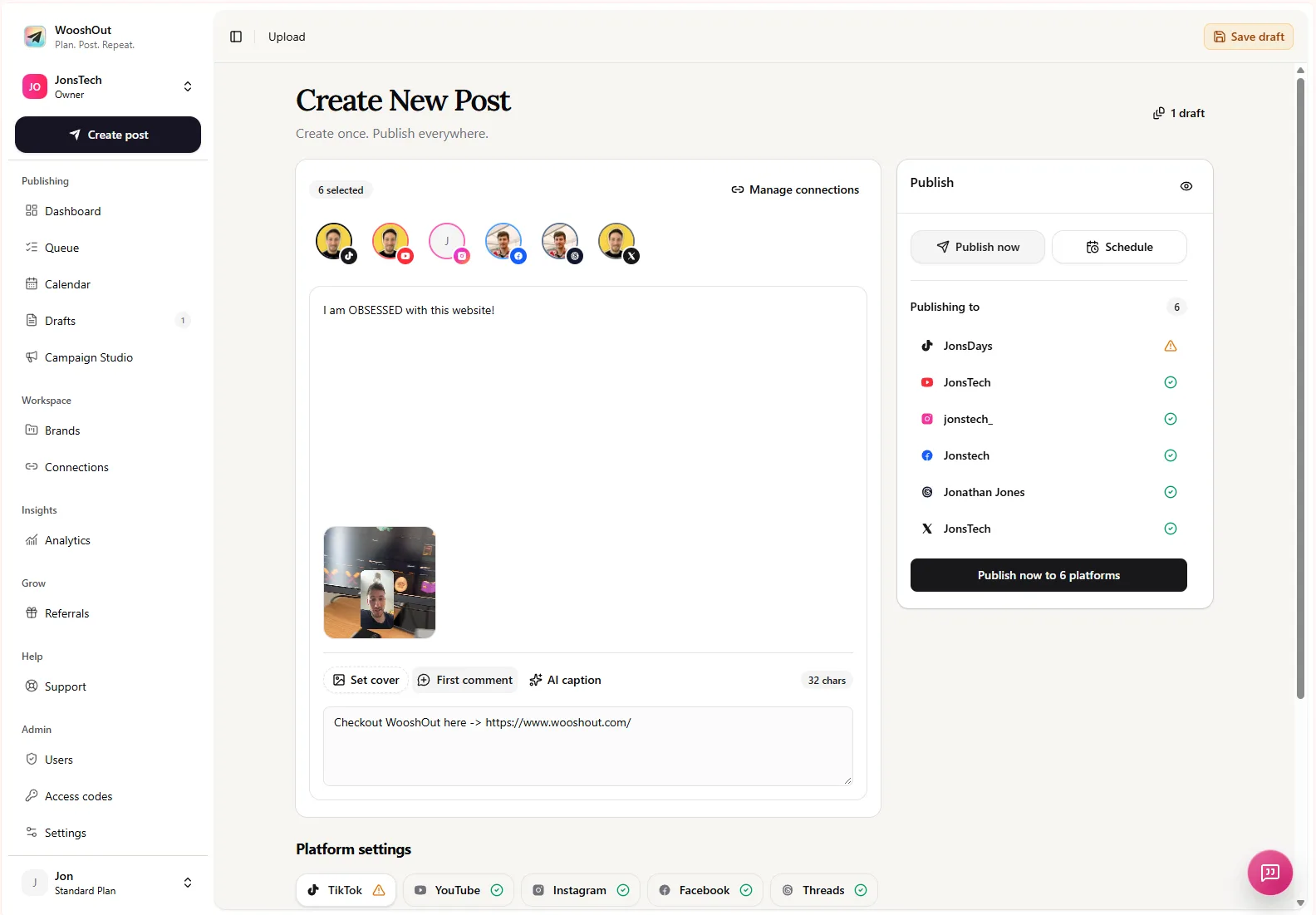
You can keep a shared starting point in WooshOut and adjust captions and supported settings for individual networks. That matters because the same clip might need a little more context in one caption, a different opening line elsewhere, or a different post format. Supported formats and controls vary by destination, so review the options and compatibility indicators rather than assuming every version will be identical.
Build a reviewable week of posts
Once the angles are clear, make a small content plan. A week is a convenient planning window, not a rule that you must post every day. Give each item a working title, its audience question, its format and a draft call to action. For example:
Post 1: name the workflow problem the demo feature addresses.
Post 2: show the main interaction in a prepared clip or screenshot.
Post 3: explain one decision or setting in plain language.
Post 4: answer a real question raised by users or your support team.
Post 5: connect the feature to a specific, clearly described use case.
For the remaining days, use only material you can support: perhaps a second feature moment, a genuine product limitation, or a follow-up question. If the demo doesn’t provide enough distinct material, publish a shorter series instead of repeating the same claim to fill the calendar.
Use WooshOut to prepare, adapt and schedule
In WooshOut, open Create post to add the prepared media or write a text post, choose compatible connected destinations, and draft the shared message. Add platform-specific captions where they help. Review the preview and the compatibility state for each destination, then save unfinished work as drafts or choose a publishing time and timezone for approved posts. WooshOut publishes selected destinations as separate operations, so their results can be checked individually afterward.
Drafts give you a place to return to posts that still need copy, assets or a factual check. The Calendar helps you see the planned sequence, while the Queue provides a closer look at scheduled work and publishing outcomes. Scheduling is not a substitute for review: check the product details, spelling, links, selected accounts and each destination’s version before you commit.
For a step-by-step explanation of selecting destinations, checking compatibility and scheduling a post, see WooshOut’s publishing workflow.
Check that the posts are genuinely different
Before scheduling, read the series in order. Can you explain in one sentence what each post offers that the others don’t? If several answers sound the same, change the angle, find another useful moment in the demo or remove the duplicate. Then check every product claim against the current product and use real customer evidence only when you have permission and reliable details.
The practical aim is not to make one demo look like more than it is. It is to notice the different questions a useful demonstration can answer, create a distinct post for each worthwhile answer, and prepare those posts carefully for the places you publish.