

Published 29 October 2026 · By JonsTech
Why Social Media Analytics Are Not Real-Time
Social media dashboards can differ from live counters because platforms report different metrics on different schedules, while dashboards may cache the results. Here’s how to compare reporting windows, check sync health and interpret WooshOut Analytics.
Social media analytics in a dashboard may not match a platform’s live counter because the numbers come from separate reporting systems, can cover different time windows and may be cached before you see them. Before treating a difference as a problem, compare the reporting periods and metric definitions, then check when each account last synced.
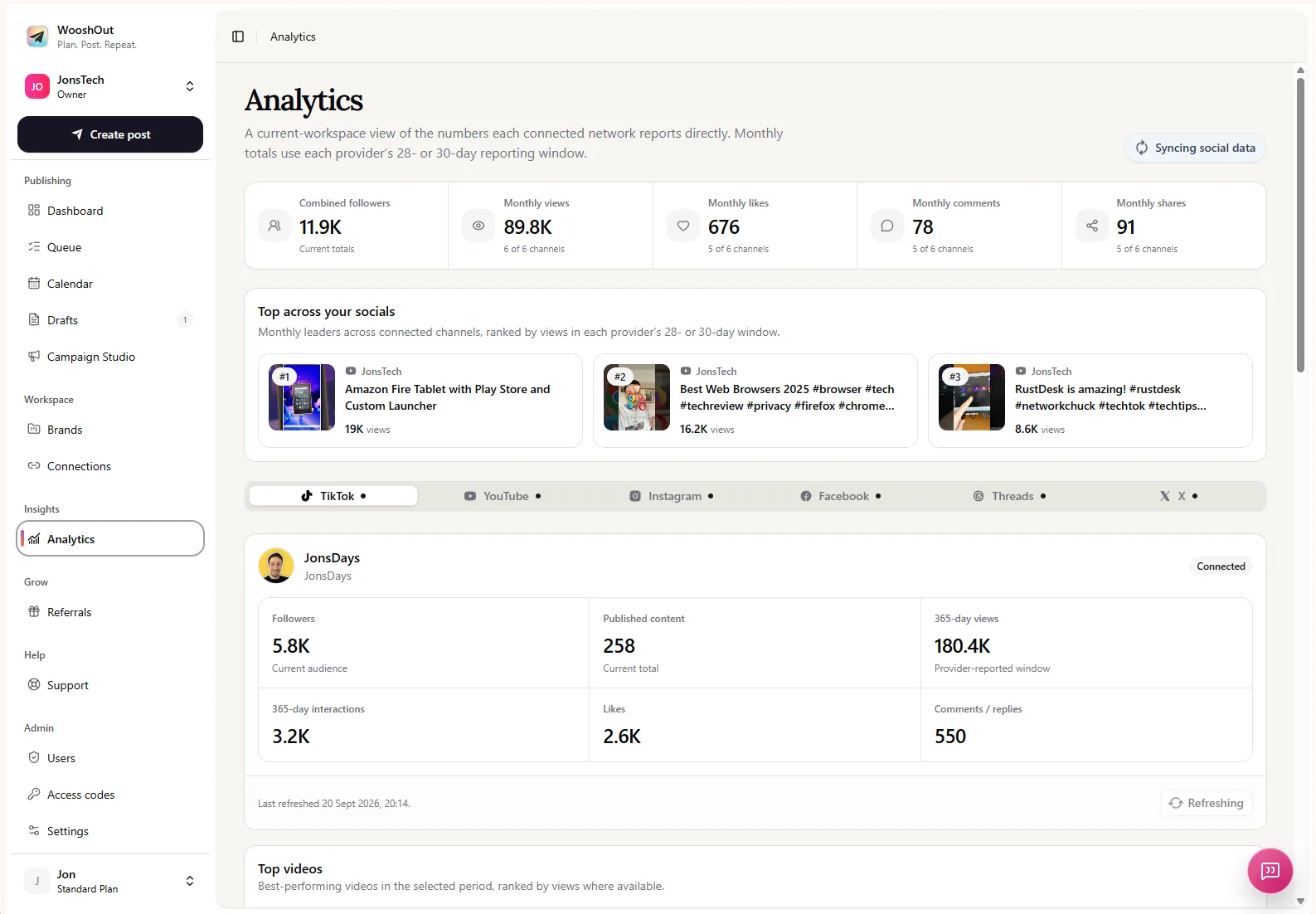
A dashboard can bring results from TikTok, YouTube, Instagram, Facebook, Threads and X into one place, but it cannot make each network report on the same timetable or define every metric in the same way. That makes analytics useful for reviewing patterns, not always for checking what happened in the last few minutes.
A live counter and a report may measure different things
“Views” sounds like a single, universal number. In practice, a platform may distinguish between types of views, apply eligibility rules or update a counter separately from its reporting API. A dashboard can only show the fields made available to it by the connected network, so its collection of metrics may not match every figure in the native app.
YouTube provides one clear example: Google says data in YouTube Analytics API reports is not real-time and typically has a processing delay of 48 to 72 hours. The report’s end date only includes days for which all requested metrics are fully processed. So a current-looking dashboard can still show a reporting period that ends before the latest activity visible in YouTube Studio. Read YouTube’s data freshness and latency guidance for the detail.
Even when two screens use similarly named metrics, compare like with like: the same account, post, metric, date range and timezone. A monthly total in one view is not a fair comparison with a daily figure in another. Nor is a channel-wide total necessarily the same as adding up the posts visible in a filtered report.
Caching adds another layer of delay
A social media dashboard usually has to request data from connected networks, then store a copy for display. That copy is cached: it avoids fetching everything again every time you open the page, but it also means the displayed values can be older than the latest figures in a platform’s app. The network may have a reporting delay of its own, so refreshing a dashboard cannot make data arrive before the provider makes it available.
WooshOut’s Analytics uses provider-reported metrics and cached refreshes. Its stated refresh policy is that most eligible connected networks refresh at most once per UTC day, while X refreshes at most once every seven days. These are maximum refresh frequencies, not promises that every metric updates immediately after a post. Automatic pulls may also pause when an account does not have effective paid access; previously cached figures can remain visible.
UTC matters because a UTC day may not match the calendar day in your local time zone. If you are checking late in the evening, a new refresh may fall on a different UTC date than you expect. Check the sync information shown in Analytics rather than assuming a local midnight starts a fresh reporting cycle.
What coverage and sync indicators tell you
A combined total can look precise while hiding gaps in the accounts behind it. WooshOut’s Analytics coverage indicators help show which connected accounts contribute data. Its sync health information can also flag when an account has not refreshed as expected or needs attention. Read those indicators alongside the number, not as a footnote.
For example, if your combined follower figure looks unchanged, check whether every intended account is included and whether its data is recent. A missing or stale connection can make the overall picture incomplete without meaning that the native platform’s count is wrong. Likewise, different networks may report different fields, so a combined dashboard will not necessarily offer an identical set of measurements for every channel.
WooshOut’s Analytics brings available audience and performance figures from connected channels into one workspace, with network-specific views and top content where data is available. The figures are provider-reported and cached, not live counters. For more on comparing network data fairly, see how to read social media analytics across platforms.
A quick check before drawing conclusions
Match the reporting window. Compare the same dates, time zone and account in both places. Check whether a report ends at the last fully processed day rather than today.
Match the metric. Confirm you are comparing the same measure and scope, such as channel-wide views versus views on one post.
Check coverage. Look for excluded accounts or unavailable metrics before relying on a combined total.
Check the last sync. If a connection is stale or needs attention, treat its figures as a partial or older snapshot.
Allow for provider processing. If the native platform itself is still processing the data, a dashboard refresh may not change the result yet.
Use dashboards for trends, not instant verdicts
If a figure differs, first ask whether the two views cover the same thing and whether their data is equally fresh. A gap can be a reporting-window mismatch, a metric-definition difference, a cached snapshot or an account with incomplete coverage. Once those checks are clear, the dashboard is better suited to what it does well: reviewing provider-reported results across connected channels and spotting content worth a closer look.
For a practical next step, open Analytics and review the account coverage and sync health before comparing totals. To follow what happened to scheduled posts on each destination, see how to track cross-platform posts after scheduling.
Editorial check before publication: please supply a current WooshOut Analytics screenshot that clearly shows sync health or coverage. Confirm the refresh cadence and available metrics against current primary-provider documentation before publishing those product-specific details.