

Published 7 October 2026 · By JonsTech
How to Read Social Media Analytics Across Platforms
Learn why social media metrics differ by platform, and use reporting periods, metric definitions and data coverage to compare results without turning them into a misleading cross-platform score.
When you review social media analytics for a SaaS launch, compare like with like: use the same reporting period, label what each platform’s metrics mean, and note which accounts or posts are covered. Treat provider-reported figures as directional evidence, not ingredients for one cross-platform score. A view on one network and a view on another may not represent the same kind of attention, and neither alone tells you whether a post helped your product.
That approach is more useful than asking which platform “won” from a row of unlike numbers. You can still look for patterns: which post attracted more views on a particular network, which format prompted replies, or whether a launch message reached people across several channels. The key is to keep each figure attached to its definition and source.
Why the numbers don’t line up
Social networks define and report metrics through their own systems. A “view” may have different criteria from one service to another. Some platforms may show reach, while others make impressions or video views more prominent. Interactions can also be grouped differently: one report might separate likes, comments and shares, while another displays a broader total or uses replies as a label.
Coverage is another source of mismatch. A figure might describe one connected account, a selected reporting window, or only the content and metrics that provider makes available. Data can arrive on different schedules, too. So two totals displayed side by side are not necessarily based on identical dates, definitions or levels of completeness.
For a SaaS founder, this matters when deciding what to repeat. If a short product demo has more reported views on one platform than a text post elsewhere, that is a reason to investigate that platform’s result, not proof that the video performed better overall. Consider the format, audience, publication date and metric definition before drawing a conclusion.
A practical way to compare results
Use a short comparison note alongside your analytics. For each platform, record the period, the account or content included, the provider’s metric label and any important coverage limitation. This turns a bare number into something you can interpret later.
Set one reporting period. Compare the same start and end dates where possible. If a platform reports a different window, write that down rather than silently treating it as equivalent.
Name the metric as the provider presents it. Keep views, reach, impressions, interactions and engagement separate unless you have confirmed that their definitions match.
Label the coverage. Note the network, account, post type or other selection shown in the report, and whether the figures are complete for the period.
Compare patterns within each platform first. Ask whether a post did better than your own recent posts on that same network, using the same metric and a comparable period.
Use cross-platform differences as clues. They can guide what to test next, but do not add unlike metrics together or rank channels with a single score unless you have a clearly defined, justified method.
Suppose you promote an app update with a short video and a text post. Compare the video’s reported results with other videos on that network, and the text post with comparable text posts on its network. You can then ask whether the video format merits another test, or whether the message needs a clearer product benefit. You cannot conclude from raw views alone that one network delivered more valuable users.
What a combined analytics view can—and can’t—tell you
A shared workspace can make it easier to review available provider metrics without opening each network separately. WooshOut’s Analytics brings available account metrics and top content into one workspace, with views for connected networks including TikTok, YouTube, Instagram, Facebook, Threads and X. The fields differ by provider, and the figures are cached provider-reported data, not live counters.
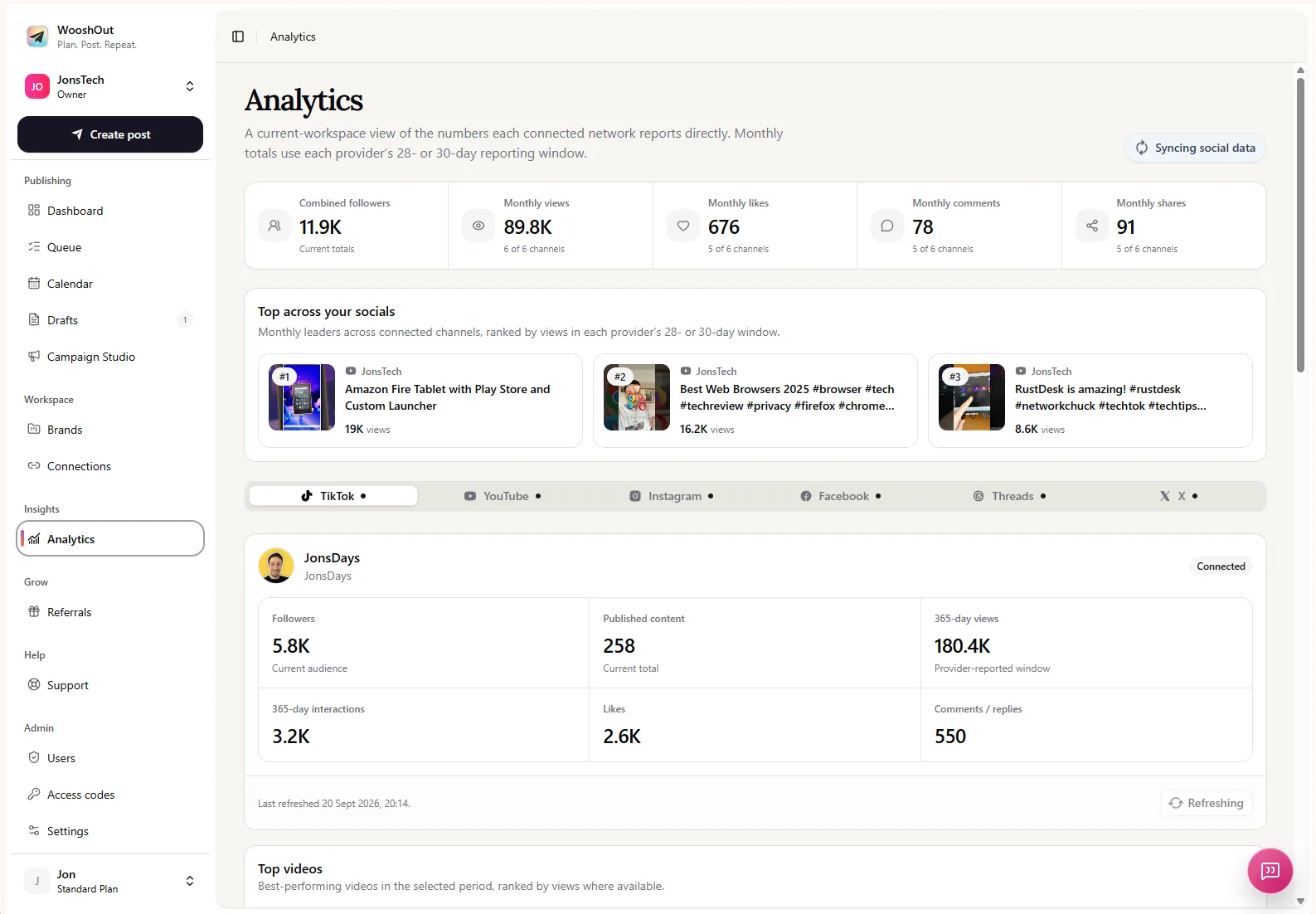
The supplied WooshOut screenshot illustrates the Analytics layout: an overview of available totals, top-content cards and individual network tabs. It is an interface example, not a dated performance comparison. The capture does not show a reporting period, so add a verified capture date and identify the selected network and date range before presenting its displayed figures as an example of results. For any specific metric, explain its on-screen label rather than assuming the same label means the same thing on every network.
Refresh timing also affects interpretation. WooshOut’s current product information describes cached analytics, with eligible non-X connections generally refreshing no more than once per UTC day and X no more than once every seven days. Provider availability and account access can affect what appears. Check the displayed sync status and coverage before making decisions from a recent post or a short reporting window.
WooshOut does not make those provider metrics directly equivalent by calculating a universal engagement rate. Use the shared view to find what is worth inspecting, then interpret each figure in its own platform context. For details on how posts are prepared and tracked across destinations, see WooshOut’s publishing workflow.
Turn the comparison into a better next test
Analytics are most useful when they shape a specific next step. If an educational post attracts views but few comments, test a clearer question or call to action on that network. If a product screenshot carousel appears among the top content, consider making another post that explains one feature in more depth. Keep the change small enough that you can tell what you are testing.
Then compare the new post with similar content on the same platform and over a comparable period. Record the result alongside your metric definition and coverage notes. That gives your team a usable learning loop without pretending that one network’s view, interaction or engagement figure is interchangeable with another’s.