

Published 18 October 2026 · By JonsTech
Can You Schedule One Social Post with Different Captions on Each Platform?
Yes. Keep the core message and media in one WooshOut composer, tailor the caption for each selected network, check compatibility, then publish or schedule the post.
Yes. You can schedule one post for several connected social accounts and give each destination its own caption. In WooshOut, add your media and core message in the Create New Post composer, select the accounts, then edit the copy and supported settings for each network before publishing or choosing a time. The point is to reuse the parts that belong together without assuming one caption is right everywhere.
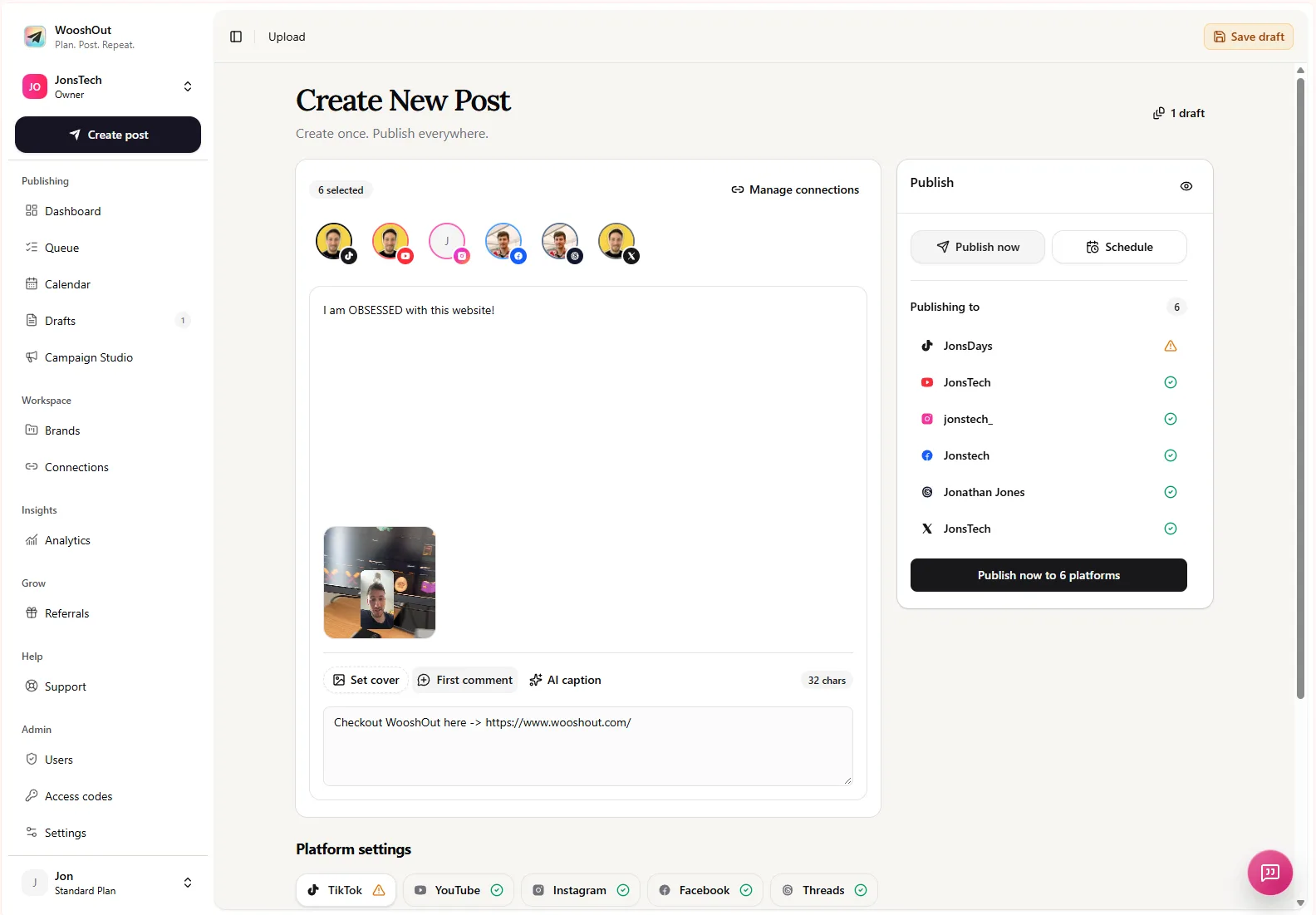
The composer screenshot shows a source post, selected accounts, a video preview, caption area and platform settings. Use that shared starting point, then review the version each destination will receive. WooshOut supports TikTok, YouTube, Instagram, Facebook, Threads and X, subject to the account, media and post type being compatible.
How to schedule one post with different captions
The workflow is straightforward: build the shared post, choose destinations, tailor the copy, check compatibility, and set the publishing time. Your source media stays in one composer, while the caption and other details can be adapted for individual networks.
Add your media and write the core message. Start with a video, image or text post, depending on the destinations you have in mind. Treat the shared caption as a useful draft, not a rule that every network must use it unchanged.
Select the connected accounts you want to publish to. You can choose compatible destinations from TikTok, YouTube, Instagram, Facebook, Threads and X. Account and format requirements differ, so check the selection against the post you are preparing.
Open each destination’s controls and adjust its copy. Keep the shared caption where it works; add a platform-specific caption where it does not. Depending on the network, you may also be able to set a first comment or adjust other publishing options.
Preview the post and review the compatibility indicators. WooshOut marks destinations as ready, warning or blocked. A warning may mean you should check a setting; a blocked destination needs a change before you can proceed with it.
Choose Publish now or Schedule, then set the date, time and timezone if scheduling. Once the post enters the queue, you can follow each destination’s result separately.
The publishing workflow covers the broader path from account readiness through compatibility checks and scheduling. The same principle applies whether you are sharing a product update, a creator video or a small-business announcement: keep the central idea consistent, and shape the delivery for the audience and format.
A practical example: one app update, three captions
Imagine an indie developer announcing a new calendar widget, with one product screenshot to use as the post image. The key message is that the widget makes upcoming events easier to see. The screenshot and announcement can remain the common source, while the captions take different approaches. These examples are hypothetical, not claims about a particular product or campaign result.
Instagram: “Your next week, at a glance. The new calendar widget puts upcoming events right on your home screen. What would you add first?”
Threads: “A small home-screen change that makes planning feel a bit clearer: our new calendar widget shows upcoming events without opening the app. What information do you like to see at a glance?”
X: “New: a calendar widget for a quicker look at what’s coming up. See your next events from the home screen.”
The product detail stays the same, but the emphasis shifts: one version invites a response, another gives a little more context, and the third gets to the announcement quickly. That is the useful distinction between cross-posting and simply copying the same caption everywhere. A different caption does not need to mean a different campaign or a new media upload.
What should change between platforms?
Start by asking what the reader needs to understand or do on each network. You might change the opening line, add context that would otherwise be missing, use a question where it feels natural, or make a call to action more specific. Keep product names, dates, links and other factual details consistent across versions.
You may also need to review platform-specific fields beyond the main caption. WooshOut’s composer offers different controls by destination, such as YouTube video details or settings for reply behaviour where supported. A first comment can be set for destinations that support it, but do not assume comments or every publishing option behave identically across networks. Check the controls shown for the accounts you selected.
AI caption help can provide editable starting copy, including suggestions such as captions, hashtags and supported first comments. Review and edit those suggestions yourself. AI output does not know which wording best represents your product, whether a claim is up to date, or how you want to speak to your audience unless you check it.
Compatibility and publishing still need a final check
Different captions solve a copy problem, not every platform-fit problem. A video may suit some destinations while an image or text post is a better fit for others. Account requirements matter too: for example, Instagram publishing requires a compatible professional account, while Facebook publishing is to an authorised Page rather than a personal profile. Follow the composer’s compatibility and account-readiness warnings before sending the post to the queue.
After scheduling, the destinations are tracked separately. If one network publishes and another encounters a problem, you can see which succeeded and which needs attention rather than treating the post as one all-or-nothing result. Where a safe retry is available, you can retry the affected destination. Publishing depends on each provider, so this is visibility into outcomes, not a guarantee that every post will publish successfully.
When this workflow is useful
This approach is handy when a founder is announcing a release across several channels, a creator is sharing one video with different context, or a small marketing team is preparing posts ahead of time. It can reduce repetitive setup by keeping the source post and selected destinations together, while leaving room to tailor the details. It will not decide the right message for you or make identical content a good fit for every audience.
For the broader feature set, see WooshOut’s publishing and scheduling tools. To prepare a post now, start with the shared message and media, then make a deliberate pass through each selected destination’s caption and compatibility status before scheduling.